
Olabi Sutras
Enterprise POS Explained: How It Differs from POS Systems Used by Small Retail Stores.
For a small retail store, a POS is often the point where a sale is completed. It helps staff bill products, accept payments, manage basic inventory, and keep track of daily sales. But as a retail business grows, the role of the POS changes significantly.
A retailer operating across dozens or hundreds of stores is dealing with far more than transactions. Inventory needs to be visible across locations, customers need to be recognized across channels, online orders may need to be fulfilled from stores, promotions need to be managed centrally, and every transaction needs to feed into the wider retail ecosystem.
This is where an enterprise POS becomes fundamentally different from a traditional POS.
The difference isn’t simply about handling more transactions or supporting more checkout counters. It is about how deeply the POS connects with the rest of the retail operation, from inventory and e-commerce to order management, customer loyalty, fulfillment, and enterprise systems.
So, what really changes when a POS needs to support 100 stores, thousands of SKUs, multiple selling channels, and millions of transactions?
Everything from how inventory is managed to how customers are served can become part of the POS experience.
The 8 Key Differences Between Enterprise POS and Small-Store POS
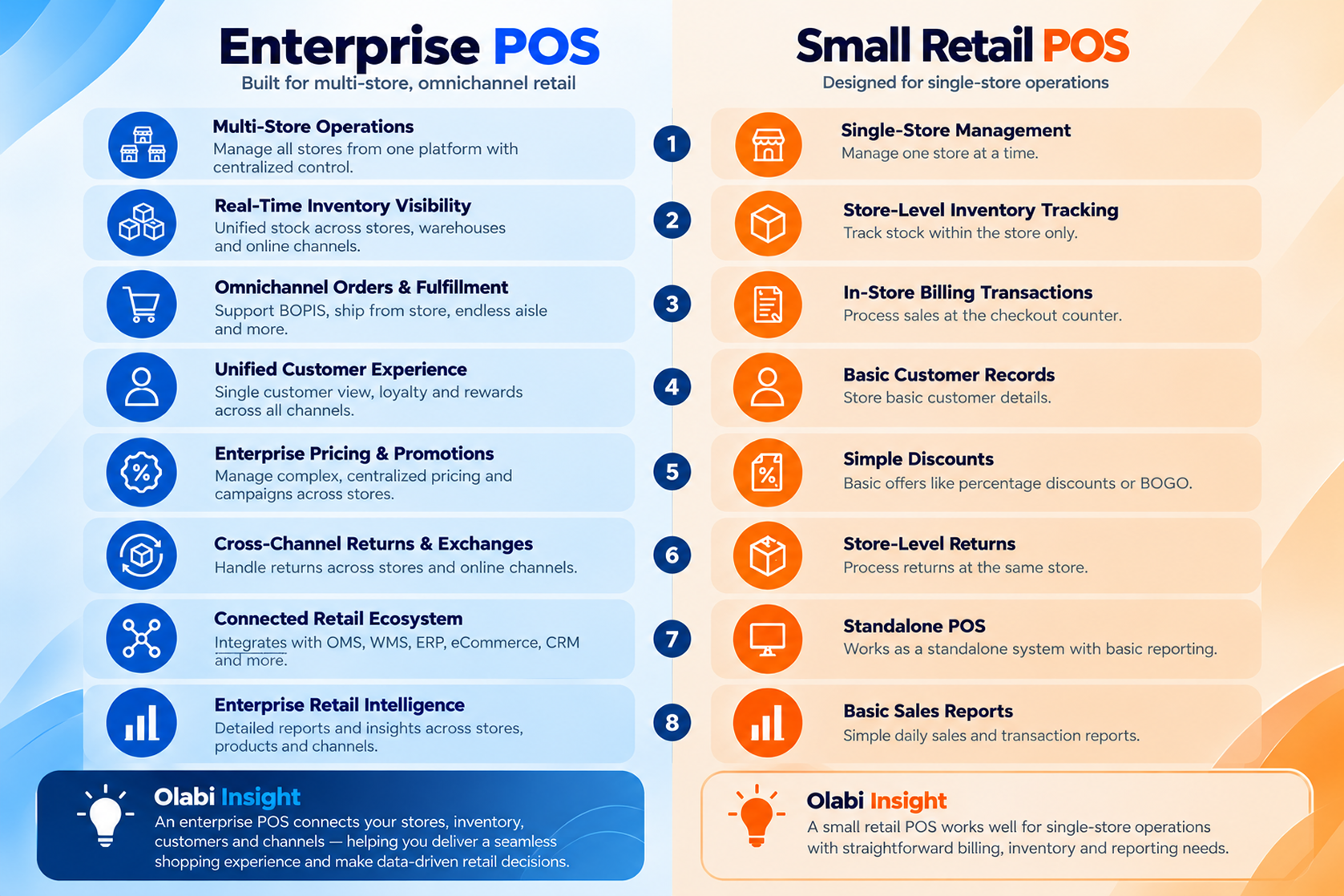
1. Single-Store Management vs. Multi-Store Operations
Small-Store POS
For a small retailer operating from one location, POS management is relatively straightforward. Products, prices, employees, sales and inventory can all be managed within the same store environment.
The system typically needs to handle:
- One store location
- Limited users
- Store-level inventory
- Basic product management
- Simple pricing
- Daily sales tracking
Enterprise POS
For a retailer operating across multiple locations, managing each store independently can create operational complexity. An enterprise POS provides centralized control while allowing individual stores to manage their day-to-day operations.
It can support:
- Multiple stores and locations
- Centralized product catalogs
- Centralized pricing and promotions
- Store-level user permissions
- Real-time store visibility
- Centralized operational controls
The key difference is scale and centralization. Instead of managing every store as an independent operation, enterprise retailers can manage their store network as one connected business.
2. Store-Level Inventory Tracking vs. Real-Time Inventory Visibility
Small-Store POS
A small retailer generally needs to know what products are available within its own store.
The POS can track:
- Stock received
- Products sold
- Current stock levels
- Low-stock items
- Basic stock adjustments
If a product is unavailable in that store, the sale may simply be lost.
Enterprise POS
An enterprise retailer needs visibility beyond the four walls of a single store.
The POS can connect with inventory across:
- Multiple stores
- Warehouses
- Ecommerce channels
- Fulfillment locations
If a product isn’t available in Store A, the retailer can potentially identify availability elsewhere and use another location to fulfill the customer’s requirement.
This is where Single Pool Inventory becomes important. Instead of treating inventory as isolated store-level pools, retailers can create a unified view of available inventory across their network.
3. Billing Transactions vs. Omnichannel Orders
Small-Store POS
The typical transaction is straightforward:
Customer → Product → Payment → Receipt
The POS is primarily responsible for completing the sale at the physical store.
Enterprise POS
For an enterprise retailer, the transaction can be part of a much larger customer journey:
Customer → Product → Order → Inventory → Fulfillment → Delivery/Collection
The POS may need to support or connect with:
- Buy Online, Pick Up In Store
- Ship From Store
- Store fulfillment
- Endless Aisle
- Store-to-store fulfillment
- Online-to-store returns
The customer doesn’t necessarily have to purchase what is physically available at the checkout counter. The enterprise POS can become a gateway to the retailer’s broader inventory and fulfillment network.
4. Basic Customer Records vs. Unified Customer Experience
Small-Store POS
Customer information may be limited to basic details associated with a transaction, such as:
- Name
- Phone number
- Purchase history
- Basic customer profile
The primary objective is often to record the transaction and customer information.
Enterprise POS
Enterprise retailers need to understand customers across stores and channels.
An enterprise POS can connect with:
- Customer profiles
- Purchase history
- Loyalty programs
- Rewards
- Customer preferences
- Online and offline interactions
This creates a Single View of Customer, allowing retailers to recognize customers across touchpoints rather than treating every purchase as an isolated transaction.
5. Simple Discounts vs. Enterprise Pricing & Promotions
Small-Store POS
Promotions are often relatively straightforward.
For example:
10% off all products or Buy 2, Get 1 Free
These offers can generally be configured and managed at the store level.
Enterprise POS
Large retailers may need to manage multiple pricing and promotional rules simultaneously.
For example:
- Store-specific pricing
- Product-level offers
- Category discounts
- Loyalty pricing
- Coupons
- Bundle offers
- Campaign-specific promotions
- Customer-specific offers
- Product exclusions
These rules need to be managed consistently across multiple stores and channels.
An enterprise POS therefore needs to support centralized pricing and promotion management, while still applying the appropriate rules at the point of sale.
6. Store-Level Returns vs. Cross-Channel Returns & Exchanges
Small-Store POS
Returns are generally handled at the same store where the purchase was made.
The process is straightforward:
Purchase → Return → Refund/Exchange
The POS retrieves the transaction and processes the return.
Enterprise POS
Returns can happen across stores and channels.
For example:
Online purchase → Customer visits Store A → Requests an exchange → Replacement sourced from Store B
To handle this successfully, the retailer needs visibility into:
- Original order
- Customer
- Transaction
- Product
- Inventory
- Payment
- Fulfillment
An enterprise POS can connect these pieces to support cross-store and omnichannel returns and exchanges.
7. Standalone POS vs. Connected Retail Ecosystem
Small-Store POS
A small retailer may use the POS as a largely standalone system.
The primary flow could be:
POS → Payment → Basic Sales Report
Other business functions may be managed separately or may not require dedicated systems.
Enterprise POS
An enterprise POS becomes part of a much larger technology ecosystem:
POS ↔ OMS ↔ WMS ↔ ERP ↔ Ecommerce ↔ CRM & Loyalty ↔ Inventory
Each system handles a different part of the retail operation, but they need to exchange information.
For example:
POS sale → Inventory updated → Customer profile updated → Loyalty points credited → Sales data reported
This connectivity allows the retailer to operate stores, ecommerce, inventory and fulfillment as connected parts of the same business.
8. Basic Sales Reports vs. Enterprise Retail Intelligence
Small-Store POS
A small retailer typically needs straightforward reports such as:
- Daily sales
- Product sales
- Payment summaries
- Basic inventory reports
- Transaction history
These reports answer a simple question:
What did my store sell?
Enterprise POS
Enterprise retailers need to answer much broader questions:
- Which stores are performing best?
- Which products are selling faster in specific locations?
- Where is inventory accumulating?
- Which channels are generating the most revenue?
- How are promotions affecting sales?
- What are customers purchasing?
- How is inventory moving across the network?
Enterprise POS data can therefore contribute to:
- Store performance analysis
- Product performance
- Inventory movement
- Customer behavior
- Channel performance
- Sales trends
- Promotional analysis
The difference isn’t simply more reports. It is the ability to turn transaction data into actionable retail intelligence that can support decisions across stores, inventory, customers and channels.
Why This Difference Matters More as a Retailer Scales
The need for an enterprise POS doesn’t necessarily appear when a retailer opens its second store. It becomes increasingly important as the number of stores, products, customers, transactions and selling channels grows.
At 5 Stores: Basic Systems May Still Work
With a handful of stores, retailers may still be able to manage operations through relatively simple POS and inventory systems.
Teams can often maintain visibility across stores with limited manual coordination, and operational complexity remains manageable.
At this stage, a traditional POS may be sufficient for the retailer’s immediate requirements.
At 50 Stores: Complexity Starts to Compound
As the store network grows, managing each location independently becomes increasingly difficult.
Retailers now need to coordinate:
- Inventory across multiple locations
- Centralized pricing and promotions
- Product information
- Store operations
- Customer data
- Employee access
- Transfers between stores
- Ecommerce and physical stores
What worked for five stores may no longer provide the visibility and control required across fifty.
At 200+ Stores: Disconnected Systems Become a Business Problem
At enterprise scale, even small operational gaps can have a significant impact.
Disconnected systems can lead to:
- Inventory blind spots: Teams may not have a reliable view of stock across stores and warehouses.
- Operational inefficiencies: Store and central teams may spend more time reconciling information between systems.
- Poor customer experience: Customers may be told a product is unavailable even when it exists elsewhere in the retail network.
- Manual reconciliation: Sales, inventory and order information may need to be consolidated across multiple systems.
- Fragmented customer data: Customer interactions across stores and digital channels can remain disconnected.
- Difficult omnichannel fulfillment: Retailers may struggle to use their entire store network as a fulfillment network.
At this point, the question is no longer simply “Can the POS process transactions?”
It becomes:
“Can the POS support the way the entire retail business operates?”
This is where an enterprise POS becomes increasingly valuable, providing the connectivity, visibility and scalability needed to operate a growing retail network.
What Should Retailers Look for When Choosing an Enterprise POS?
Choosing an enterprise POS requires looking beyond checkout functionality. The right platform should support the retailer’s current operations while providing the architecture and connectivity needed as the business grows.
Multi-Store Architecture
The platform should support centralized management across multiple stores while allowing individual locations to manage their day-to-day operations.
Cloud-Based Platform
A cloud-based POS can provide centralized access to applications, data and updates across the retail network, reducing dependence on store-level infrastructure and making it easier to manage a growing store footprint.
Real-Time Inventory
The POS should provide visibility into inventory across stores, warehouses and other fulfillment locations, helping retailers identify where products are available and how they can be used to fulfill customer demand.
Omnichannel Capabilities
The platform should connect physical stores with digital channels and support journeys such as Buy Online, Pick Up In Store, Ship From Store and store-based fulfillment.
Endless Aisle
Store associates should be able to access inventory beyond their own store and help customers purchase products that may not be physically available at that location.
OMS and WMS Integration
An enterprise POS should integrate with Order Management and Warehouse Management systems so that sales, orders, inventory and fulfillment remain connected across the retail operation.
Loyalty and Customer Integration
The POS should connect with customer and loyalty systems to provide access to customer profiles, purchase history, rewards and relevant offers at the point of interaction.
Centralized Pricing and Promotions
Retailers should be able to manage pricing and promotional rules centrally while ensuring the correct offers are applied across stores and channels.
Cross-Channel Returns
The platform should support returns and exchanges across stores and digital channels, giving staff access to the relevant order and transaction information regardless of where the original purchase occurred.
Store Fulfillment
The POS and wider retail platform should enable stores to participate in fulfillment, allowing retailers to use available store inventory to serve online and offline demand.
APIs and Third-Party Integrations
Enterprise retailers rarely operate with a single application. The POS should provide APIs and integration capabilities that allow it to connect with ecommerce platforms, ERP, WMS, OMS, CRM, payment providers and other retail technologies.
Enterprise Reporting
The platform should provide centralized visibility into sales, inventory, customers, stores and channels, allowing retail teams to move beyond basic transaction reports and make decisions using data from across the business.
Scalability
Perhaps most importantly, the POS should be capable of growing with the retailer.
A platform that works for 20 stores should not become a bottleneck at 100 or 500 stores. Retailers should evaluate whether the system can scale across:
- Number of stores
- Users and terminals
- SKUs
- Transactions
- Customers
- Orders
- Selling channels
- Integrations
- Data volumes
The right enterprise POS isn’t simply the system that meets today’s requirements. It is the platform that can support the retailer’s next stage of growth without requiring it to rebuild its technology ecosystem from scratch.
When Is It Time to Move Beyond a Traditional POS?
Not every retailer needs an enterprise POS from day one. But as operations become more complex, the limitations of a traditional POS can become increasingly visible.
If your retail business is experiencing several of the following challenges, it may be time to evaluate whether your current POS can support the next stage of growth.
You Operate Multiple Stores
Managing multiple stores through disconnected POS systems can make it difficult to maintain consistent pricing, product information, inventory visibility and operational controls across the network.
Your Inventory Is Fragmented
If your teams can only see inventory at individual stores instead of having a unified view across locations, you may be missing opportunities to fulfill customer demand from available stock elsewhere.
Your Ecommerce and Stores Operate Independently
When online and offline channels operate as separate systems, customers may experience different inventory availability, pricing, order and return processes depending on where they shop.
Customers Can’t Access Inventory Across Locations
A customer shouldn’t have to leave a store empty-handed simply because the product isn’t available at that particular location. If store associates have no way to identify or access inventory elsewhere, the retailer can lose a sale that could have been fulfilled through another location.
Store Staff Can’t Fulfill Online Orders
Your stores can potentially become valuable fulfillment locations. If your POS and retail systems aren’t connected to order management and inventory, however, that store inventory may remain unavailable for online fulfillment.
Promotions Are Difficult to Manage Centrally
If pricing and promotions have to be configured or maintained store by store, managing campaigns consistently across a growing retail network can become time-consuming and prone to errors.
Returns Happen Across Channels
If customers regularly purchase online and return or exchange products in stores—or vice versa—your POS needs to understand transactions and orders beyond the individual store.
Customer Information Is Scattered
When customer data, purchase history and loyalty information exist across separate systems, store associates may not have the context they need to provide a consistent customer experience.
Teams Rely on Spreadsheets and Manual Reconciliation
If teams regularly export data from different systems and manually reconcile sales, inventory or orders, it can indicate that the underlying retail systems aren’t sufficiently connected.
Your Retail Systems Don’t Communicate
If your POS, ecommerce platform, OMS, WMS, ERP and loyalty systems operate independently, information has to move between them manually or through disconnected processes.
The more of these challenges a retailer faces, the more important it becomes to evaluate the POS as part of the overall retail technology architecture, rather than as a standalone billing solution.
When Is It Time to Move Beyond a Traditional POS?
Not every retailer needs an enterprise POS from day one. But as operations become more complex, the limitations of a traditional POS can become increasingly visible.
If your retail business is experiencing several of the following challenges, it may be time to evaluate whether your current POS can support the next stage of growth.
You Operate Multiple Stores
Managing multiple stores through disconnected POS systems can make it difficult to maintain consistent pricing, product information, inventory visibility and operational controls across the network.
Your Inventory Is Fragmented
If your teams can only see inventory at individual stores instead of having a unified view across locations, you may be missing opportunities to fulfill customer demand from available stock elsewhere.
Your Ecommerce and Stores Operate Independently
When online and offline channels operate as separate systems, customers may experience different inventory availability, pricing, order and return processes depending on where they shop.
Customers Can’t Access Inventory Across Locations
A customer shouldn’t have to leave a store empty-handed simply because the product isn’t available at that particular location. If store associates have no way to identify or access inventory elsewhere, the retailer can lose a sale that could have been fulfilled through another location.
Store Staff Can’t Fulfill Online Orders
Your stores can potentially become valuable fulfillment locations. If your POS and retail systems aren’t connected to order management and inventory, however, that store inventory may remain unavailable for online fulfillment.
Promotions Are Difficult to Manage Centrally
If pricing and promotions have to be configured or maintained store by store, managing campaigns consistently across a growing retail network can become time-consuming and prone to errors.
Returns Happen Across Channels
If customers regularly purchase online and return or exchange products in stores—or vice versa—your POS needs to understand transactions and orders beyond the individual store.
Customer Information Is Scattered
When customer data, purchase history and loyalty information exist across separate systems, store associates may not have the context they need to provide a consistent customer experience.
Teams Rely on Spreadsheets and Manual Reconciliation
If teams regularly export data from different systems and manually reconcile sales, inventory or orders, it can indicate that the underlying retail systems aren’t sufficiently connected.
Your Retail Systems Don’t Communicate
If your POS, ecommerce platform, OMS, WMS, ERP and loyalty systems operate independently, information has to move between them manually or through disconnected processes.
The more of these challenges a retailer faces, the more important it becomes to evaluate the POS as part of the overall retail technology architecture, rather than as a standalone billing solution.
Conclusion
A POS may begin as a tool for completing transactions, but its role changes as a retail business grows.
For a small retailer, the priority may simply be efficient billing and basic store management. For an enterprise retailer, the POS needs to connect the store with the broader retail operation, from inventory and customers to orders, fulfillment, ecommerce and loyalty.
A traditional POS helps a store sell. An enterprise POS helps a retail business operate.
That distinction matters when a retailer is managing multiple locations, thousands of products and customers who expect a consistent experience across every channel.
Ready to Move Beyond Traditional POS?
Olabi’s Cloud POS is built for modern enterprise retail, connecting store operations with real-time inventory, customer data, orders, fulfillment, loyalty and the wider omnichannel ecosystem.
Give your stores the technology they need to sell smarter, serve customers better and operate as part of one connected retail network. Schedule a Demo with Olabi.
Share This Story, Choose Your Platform!
About the Author: Olabi

