
Olabi Sutras
How a Retail ERP Connects Your Store, Warehouse and Finance in One View
Retail businesses today operate through multiple operational systems, including store POS platforms, warehouse management tools, inventory databases, and financial systems. For retailers to maintain operational efficiency, these systems need to work together so that information such as sales transactions, stock movements, and financial records remains synchronized across the organization.
A Retail ERP enables this connectivity by acting as the central system that links these operational layers. Instead of operating as isolated tools, store billing systems, warehouse inventory, and financial processes can operate through a shared data environment where every transaction flows through the same system. When a sale is completed at the store, the Retail ERP can automatically update inventory levels, reflect the stock movement within the warehouse system, and record the corresponding financial entry.
This level of integration is typically enabled through integrated ERP modules, centralized data structures, and API-based connections that allow different operational systems to exchange data in real time. As a result, retailers can move away from fragmented workflows and operate with a connected system architecture where store operations, warehouse processes, and financial reporting remain aligned.
In this article, we explore how a Retail ERP connects store operations, warehouse management, and financial systems into a single operational view, enabling retailers to manage their entire business through a unified platform.
Retail ERP as the Core System Layer
A Retail ERP functions as the central operational platform that connects various retail subsystems into a single integrated environment. Instead of operating through separate applications for billing, inventory, warehouse management, and finance, retailers can manage these functions through a unified system where operational data flows across departments in real time.
In a typical retail technology architecture, multiple operational layers work together to support day-to-day business activities. These layers often include the POS layer for store billing, the inventory layer for stock tracking, warehouse management systems for stock movement and fulfillment, finance and accounting modules for financial recording, and procurement systems for purchasing and replenishment planning. A Retail ERP connects these layers so that transactions occurring in one part of the business automatically reflect across the others.
For example, when a product is sold at the POS, the Retail ERP records the transaction and immediately updates inventory levels, reflects the stock movement in the warehouse records, and generates the corresponding financial entry. This integrated architecture ensures that operational data remains consistent across the entire retail system.
In this structure, the Retail ERP becomes the system of record for retail operations. All core business transactions, sales, purchases, stock movements, and financial records are stored and managed within the ERP environment. This centralization ensures that every department operates using the same set of data.
A key component that enables this connectivity is the centralized database and master data management framework within the ERP. Product information, store details, pricing, and inventory records are maintained as shared master data, allowing all operational modules to reference the same information. By maintaining this centralized data structure, Retail ERP systems enable retailers to operate with greater accuracy, transparency, and operational alignment across stores, warehouses, and financial systems.
Connecting Store POS with Inventory Systems
One of the most critical integrations within a Retail ERP is the connection between the store POS system and inventory management. In a connected retail environment, every billing transaction at the store automatically updates inventory records, ensuring that stock data remains accurate across the entire retail network.
When a transaction occurs at the POS, the Retail ERP processes it as part of a synchronized operational workflow. The integration typically follows a simple but powerful data flow. The moment a billing event is completed at the POS, the system identifies the product’s SKU (Stock Keeping Unit) and deducts the corresponding quantity from the store’s inventory. This deduction is immediately reflected within the centralized inventory database maintained by the ERP.
Once the SKU deduction occurs, the system automatically synchronizes stock levels across stores and warehouses. This ensures that the updated inventory data is visible to other store locations, warehouse teams, and operational dashboards in real time. As a result, the entire retail network operates using the same inventory information.
By connecting POS and inventory systems through a Retail ERP, retailers gain several operational advantages. The most important benefit is real-time stock visibility, where store managers and operations teams can instantly view stock availability across all locations. This integration also enables automated replenishment triggers, where the system can initiate restocking workflows when inventory levels fall below defined thresholds.
In addition, a connected POS–inventory architecture significantly reduces stock discrepancies that often occur when billing and inventory systems operate independently. Because every sale automatically updates the inventory records, retailers can maintain accurate stock data, improve operational control, and ensure smoother store operations across the entire retail network.
Connecting Store POS with Inventory Systems
A key capability of a Retail ERP is the ability to connect store-level POS transactions directly with the inventory management system. When these systems are integrated, every transaction that occurs at the billing counter immediately reflects in the inventory records without requiring manual updates.
The integration typically begins with a billing event at the POS. Once a sale is completed, the system identifies the product through its SKU (Stock Keeping Unit) and automatically deducts the sold quantity from the store’s inventory. This deduction is then recorded within the ERP’s centralized inventory database.
After the SKU deduction is processed, the updated stock information is synchronized across the retail network, including other stores and the warehouse. This ensures that all operational systems operate using the same inventory data in real time. Store teams, warehouse operators, and management dashboards can instantly view updated stock availability across locations.
By connecting POS with inventory systems, retailers gain real-time stock visibility, allowing them to monitor product availability at both store and warehouse levels. This integration also enables automated replenishment triggers, where the system can initiate stock movement or purchase processes when inventory levels fall below defined thresholds. In addition, automated synchronization significantly reduces stock discrepancies, which commonly occur when billing and inventory systems operate independently.
Connecting Warehouse Operations to Store Demand
Beyond store-level inventory updates, a Retail ERP also connects warehouse operations directly with store demand. This integration ensures that warehouse stock movement and distribution decisions are based on real-time store sales data rather than manual forecasting.
The process begins with store sales demand, where POS transactions continuously generate data about which products are selling and at what rate. The Retail ERP aggregates this information and compares it with warehouse stock availability. Based on this comparison, the system can automatically identify products that need replenishment at specific store locations.
Once demand is identified, the ERP can generate automated replenishment orders, triggering warehouse dispatch workflows or stock transfers. This ensures that stores receive the required inventory before stockouts occur.
Through this connected structure, the Retail ERP supports several important warehouse functions. It enables inter-store stock transfers, allowing retailers to redistribute inventory between locations when demand varies across stores. The system also assists with warehouse dispatch planning, helping operations teams prepare shipments based on store-level requirements. At a broader level, the ERP provides centralized inventory control, allowing retailers to monitor and manage stock movement across the entire retail network from a single platform.
Connecting Retail Transactions with Finance Systems
A Retail ERP also plays a crucial role in connecting day-to-day retail operations with financial systems. In a connected ERP environment, operational transactions such as sales, purchases, and inventory movements are automatically translated into corresponding financial entries. This integration ensures that financial records are continuously updated as business activities occur.
When a transaction takes place in the retail system, the ERP processes it not only as an operational event but also as a financial record. For example, when a POS sale is completed at the store, the system can automatically generate the corresponding revenue entry within the finance module. Similarly, when new products are received from suppliers, the goods receipt transaction updates both the inventory records and the inventory valuation within the accounting system. In cases where stock is transferred between stores or warehouses, the ERP records the movement as an internal accounting entry, ensuring that inventory values remain consistent across locations.
By connecting operational systems with finance, Retail ERP platforms eliminate the need for manual data transfers between departments. This integration enables automated financial reporting, where financial data is continuously updated based on real-time operational activity. It also significantly reduces manual reconciliation efforts, as sales, inventory movements, and purchase transactions are already aligned with accounting records. As a result, retailers gain real-time visibility into profitability, allowing finance teams and management to assess business performance more accurately.
API-Based Integration for External Systems
In addition to connecting internal retail operations, modern Retail ERP systems also support integration with external platforms through API-driven architecture. APIs (Application Programming Interfaces) enable different software systems to exchange data in real time, allowing retailers to connect their ERP platform with other digital tools used across the business.
Through APIs and middleware layers, Retail ERP systems can integrate with a wide range of external applications. These may include e-commerce platforms, where online orders and product data are synchronized with inventory and order management systems. ERP platforms can also connect with payment gateways, allowing transaction data from digital payments to flow directly into the system. Similarly, integration with logistics and delivery systems enables order fulfillment tracking and shipment updates. Retailers can also connect ERP platforms with CRM systems to synchronize customer data, purchase history, and engagement information.
This API-based connectivity allows Retail ERP platforms to function as the central hub within a broader retail technology ecosystem. By enabling seamless communication between internal systems and external platforms, API-driven architectures help retailers maintain consistent data, automate workflows, and operate more efficiently across both physical and digital retail channels.
Creating a Connected Retail Data Flow
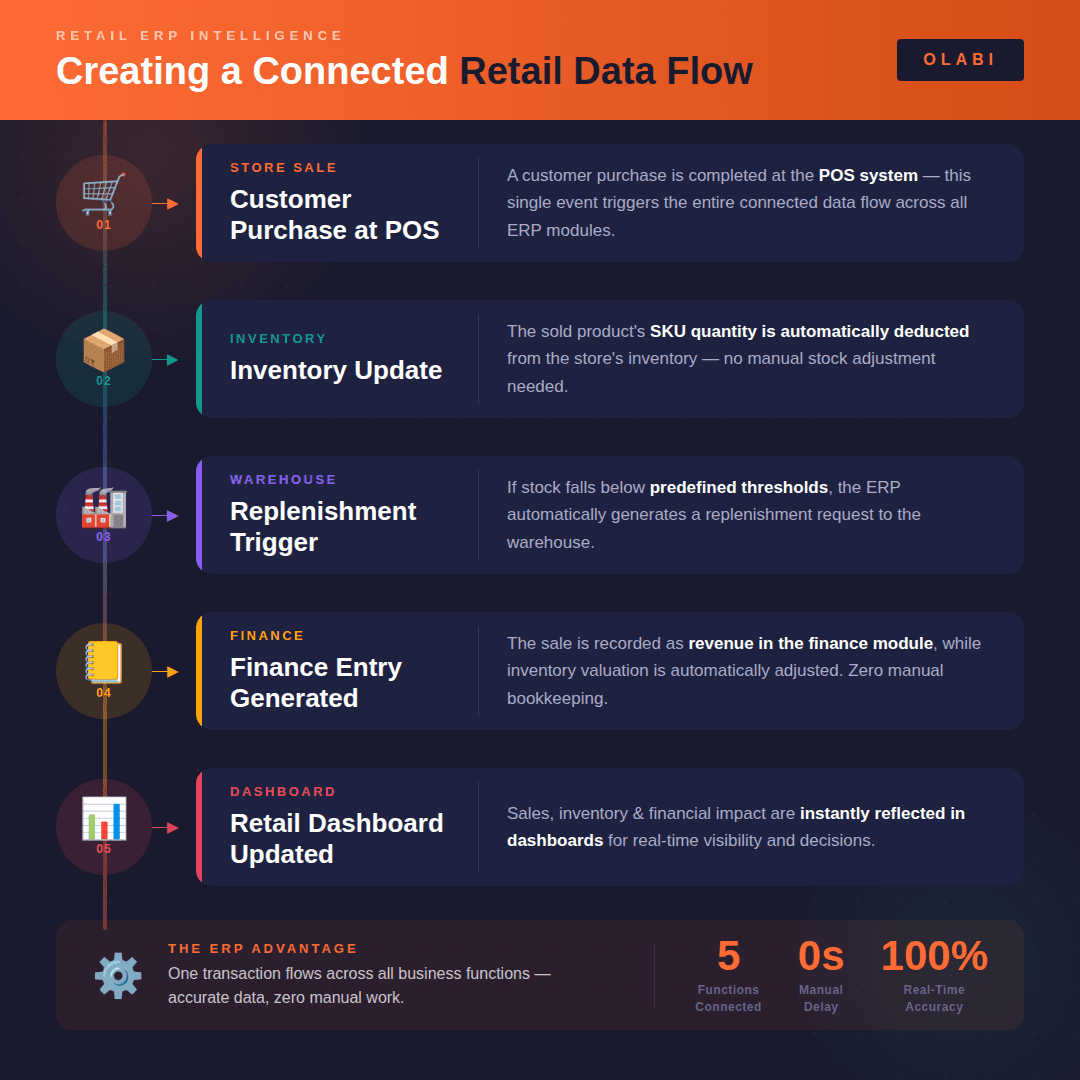
A Retail ERP ensures that a single transaction triggers updates across multiple operational functions. Instead of separate systems processing the same data independently, the ERP enables a connected workflow where information flows automatically across departments.
A typical connected retail data flow may look like this:
- Store Sale: A customer purchase is completed at the POS system.
- Inventory Update: The sold product’s SKU quantity is automatically deducted from the store’s inventory.
- Warehouse Replenishment Trigger: If stock levels fall below predefined thresholds, the ERP generates a replenishment request to the warehouse.
- Finance Entry Generated: The sale is recorded in the finance module as revenue, while inventory valuation is adjusted accordingly.
- Retail Dashboard Updated: Sales performance, inventory movement, and financial impact are instantly reflected in management dashboards.
By connecting these processes, a Retail ERP ensures that one operational event flows across multiple business functions without requiring manual intervention. This connected data flow helps retailers maintain accurate information across systems while improving operational visibility and decision-making.
Unified Operational Visibility
A Retail ERP enables retailers to manage their entire business through a single operational dashboard where data from stores, warehouses, and finance systems is consolidated. Because all operational systems are connected within the ERP, management teams can view real-time insights without relying on separate reports from different departments.
This unified visibility allows retailers to monitor key operational metrics in one place. For example, management teams can track store sales performance to understand which locations or product categories are generating the most revenue. At the same time, the dashboard can display warehouse stock levels, helping operations teams ensure that stores are adequately stocked and that replenishment processes are functioning efficiently.
Financial insights are also integrated into the same view. Retailers can monitor financial performance, including revenue trends and inventory valuation, directly alongside operational data. In addition, connected systems allow the ERP to highlight product demand trends, helping retailers identify fast-moving products, seasonal demand shifts, and inventory planning requirements.
By bringing these insights together, Retail ERP systems provide a holistic view of retail operations. This unified perspective helps management teams make faster decisions, respond quickly to operational changes, and maintain better control over store performance, inventory management, and financial outcomes across the retail network.
Conclusion
As retail businesses expand across multiple stores, warehouses, and sales channels, the ability to keep operational systems connected becomes increasingly important. When core retail functions operate through separate systems, it often creates delays in information flow and limits overall visibility into business performance.
A Retail ERP addresses this challenge by bringing store operations, warehouse management, and financial processes into a single integrated environment. By connecting these operational layers within the same system architecture, retailers can ensure that sales transactions, inventory movements, and financial records remain synchronized.
This connected approach enables retailers to maintain consistent data across departments, gain real-time visibility into operations, and respond more quickly to changes in demand or inventory levels. Ultimately, a well-integrated Retail ERP helps retailers operate with greater efficiency while supporting faster and more informed decision-making across the entire business.
Platforms like Olabi Retail ERP are designed to support this connected retail architecture by bringing together store operations, inventory management, warehouse workflows, and financial visibility within a unified system. By enabling seamless data flow across these functions, Olabi helps retailers maintain operational clarity and manage their retail networks more efficiently.
Interested in seeing how a connected Retail ERP works in practice?
Schedule a demo to explore how Olabi can support your retail operations.
Share This Story, Choose Your Platform!
About the Author: Olabi


Great post! Thanks for sharing this valuable information. Keep up the excellent work.